Documentation
DrumSynth Lab User Guide
Welcome to DrumSynth Lab — a drum sound synthesizer that allows you to create and customize a wide range of drum sounds.
Welcome to DrumSynth Lab — a drum sound synthesizer that allows you to create and customize a wide range of drum sounds.
DrumSynth Lab is a drum sound synthesizer that allows you to create and customize a wide range of drum sounds. Built using the MIT-licensed source code from Paul Kellett, it offers a simple yet powerful interface for generating high-quality percussive tones ideal for music production, beat-making, or live performance.
DrumSynth Lab provides a modular approach to sound design, allowing users to combine various modules to craft unique drum sounds. Each module focuses on a specific aspect of sound synthesis, such as tone generation, noise shaping, distortion, and filtering. The application is designed to be intuitive and flexible, enabling both beginners and advanced users to explore creative possibilities.
DrumSynth Lab consists of several modules, each responsible for different aspects of sound synthesis. Here’s a list of the main modules:
Each module can be enabled or disabled individually, allowing you to build complex sounds by layering multiple effects.
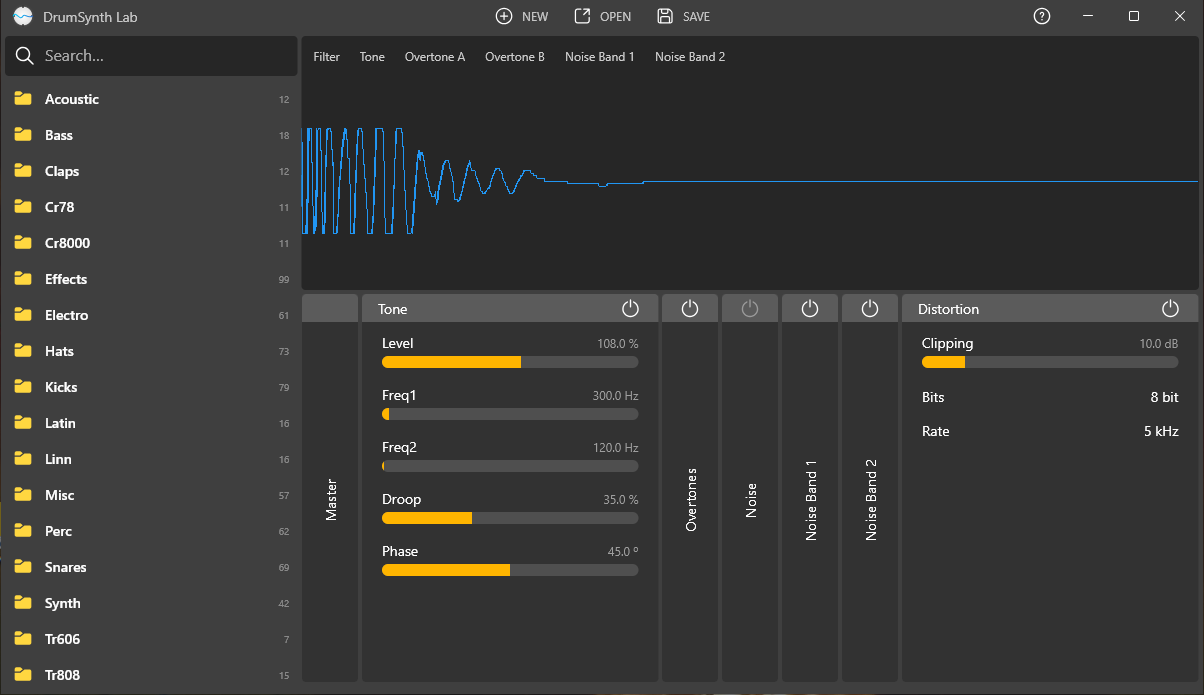
The user interface of DrumSynth Lab is divided into several sections, making it easy to navigate and control various aspects of sound synthesis:
The top menu bar contains essential controls:
The left sidebar serves as a preset browser, allowing you to organize and load presets:
The central area displays the waveform visualization of the current sound:
The bottom section contains all active modules, each with its own set of controls:
Each module has its own set of sliders and switches, allowing precise control over the sound.
On the right side of each module, there are toggle switches to enable or disable individual modules. This lets you quickly turn modules on or off without losing their settings.